Here to guide you with answers to all your questions.
Frequently Asked Questions
Top questions
LM DTS™ is a cloud-based system that tracks and records everything that happens to dental instruments, materials, and clinical assets by converting each scan into a timestamped event, so you always know where items are and who is using them.
This system is fully cloud-based and hosted by LM-Dental™, meaning that essential updates, support, and enterprise-grade security measures are all managed by LM™.
This eliminates manual guesswork and fragmented documentation by bringing all tracking data into one place. In practice, it gives clinics, universities, and dental organizations full, real-time visibility of their workflows. This leads to improved efficiency, better accountability, and more consistent processes, which collectively enhance productivity, safety, and compliance. Customers choose LM DTS™ because it provides intuitive control over essential assets and simplifies daily operations for the entire team.
No, you do not need to replace your existing instruments or materials to start using LM DTS™.
The system is designed to work with items from any manufacturer. You can retrofit your current instruments with RFID tags (LM Retrotagging), use existing manufacturer barcodes or UDI labels. This flexible approach means you can implement LM DTS™ without a large upfront investment or disruptive changes to your inventory. In practice, most clinics and organizations begin by tagging high-value or critical items and then expand gradually as they see the benefits.
No. LM DTS™ offers flexible setup options and can run with or without additional dedicated hardware.
You can start with LM DTS™ Connect by using standard barcode scanners or RFID readers that you might already have, eliminating the need to buy new devices. For more extensive automation, you can introduce dedicated hardware like LM DTS™ Tray Readers or Cabinets at key points in your workflow. This flexibility allows a small clinic, a large dental school, or a multi-site network to adopt LM DTS™ in a way that fits their current infrastructure and scale it up as needed.
Yes. LM DTS™ is built as a modular system, so you can tailor it by choosing only the modules you need.
This modular structure is reflected in the pricing: you pay based on the specific modules you use and the scope of your deployment. A standard license typically covers up to three physical sites (locations), with options to add more sites (for example, satellite clinics) for larger organizations. Importantly, LM DTS™ does not limit you by the number of users, the number of assets tracked, or the volume of tracking events. This means the system can scale with you without incremental per-user or per-item fees, making it cost-effective for expanding networks and large institutions.
Implementing LM DTS™ is straightforward because the system is designed to integrate smoothly into your existing workflows without disrupting daily operations.
The onboarding process typically starts with identifying what you want to track and then configuring the system to align with your practices. Your LM™ partner will handle much of the setup and guide you through the transition. Staff training is user-friendly and role-based, focusing only on the tasks relevant to each team member. Most organizations find that adoption is quick and the learning curve is short, thanks to LM DTS™’s intuitive design and step-by-step guidance. As a result, you can begin seeing benefits soon after the system is introduced into your routine.
The value of LM DTS™ comes from the operational efficiencies and risk reductions it delivers.
By providing accurate, real-time visibility and data-driven processes, LM DTS™ helps reduce the loss or misplacement of instruments, optimize stock levels of expensive materials, and prevent the use of expired items. This translates directly into cost savings and resource optimization. In addition, automated tracking reduces manual labor on routine tasks, refocusing staff time on patient care. Many customers also note improved compliance and audit readiness, which helps avoid costly errors and supports a higher standard of care.
LM DTS™ is available through authorized local LM-Dental™ partners or LM™’s regional representatives.
To begin, you can contact your nearest LM™ partner for a consultation or book a demo through our website to discuss your needs and see LM DTS™ in action. An expert will help assess your requirements and recommend the right mix of modules and hardware (if needed) for your environment. Once you decide to proceed, the LM™ team will support you with planning, configuration, and training, ensuring the solution is tailored to your workflows from day one.
Software modules
The Asset & Process Management Module allows you to monitor and control instruments and assets from distribution to cleaning and reuse, ensuring every key process step is followed.
It records where each instrument or asset is, who used it, and confirms that cleaning and reprocessing steps (like sterilization) are completed correctly. This provides full traceability and insights into how assets flow through your operations. By using this module, large institutions (like dental schools) and clinics can identify bottlenecks, improve process reliability, allocate costs per usage, and enhance patient safety through consistent compliance with protocols.
The Inventory Management Module helps you control and optimize all your materials and consumables.
It monitors stock levels across locations, tracks usage rates by department or clinic, alerts you to low inventory or upcoming expirations, and can even forecast future needs based on historical data. This real-time visibility reduces waste (like expired items), ensures essential supplies are always available, and prevents overstocking, which helps control costs. By using this module, multi-clinic organizations and universities can harmonize their inventory management and ensure materials are used efficiently and safely.
Special Modules in LM DTS™ cover specific aspects of dental operations that need tailored tracking or workflows beyond the core modules.
These currently include an Implant Management module (for structured implant workflows and traceability), an Order Management module (for handling internal and external ordering, supplier selection, and pick lists), and a Lab Case Management module (for tracking items sent to outside labs). By adding relevant Special Modules, you can extend LM DTS™ into these specialized areas and make it a central platform for managing more complex or unique parts of your clinical operations.
Tagging & identifiers
Retrotagging means attaching a tracking tag (like an RFID chip or special barcode label) to an existing instrument so it can be tracked by LM DTS™.
This is done when your instruments don’t already have built-in identification. By retrotagging instruments from any manufacturer, you can incorporate them into LM DTS™ without buying new tools. It’s a practical way to bring your current instrument inventory under the system’s visibility. Retrotagging quickly establishes traceability and control over assets you already own, allowing you to start seeing benefits with minimal delay.
When retrotagging instruments, consider factors like the instrument type, the best location on each item to attach the tag, and the tag’s durability through cleaning and sterilization cycles.
It’s crucial to use recommended methods and materials so that you don’t interfere with instrument function or warranties. Your LM-Dental™ partner will guide you through best practices for tagging, including testing tags under your cleaning processes and ensuring compliance with any local regulations. With the right approach, retrofitted tags can last through thousands of cleaning cycles and integrate seamlessly into your existing hygiene protocols.
Yes. LM DTS™ is compatible with manufacturer barcodes and UDI (Unique Device Identification) labels as tracking identifiers.
The system can read these existing labels, meaning you often don’t need to add new tags if items already have scannable codes. This flexibility ensures you’re not locked into one tagging technology — whether it’s RFID chips, QR codes, or barcodes on packaging, LM DTS™ can incorporate them all. Using UDI parsing, the system can also extract key information from standardized codes, making it easier to integrate tracking with compliance requirements.
LM™ dental instruments with integrated RFID have the tracking chip built in from the start, ensuring immediate compatibility with LM DTS™.
Because these instruments come pre-tagged, they don’t require any retrofitting and are optimized for reliability and long-term durability. This makes implementation faster and simpler, as you can register and use them in the system right away without extra steps. Additionally, integrated RFID instruments are pre-listed in the LM DTS™ database, which means you save time on initial setup. Overall, they offer the most seamless tracking experience and serve as a convenient way to maximize the system’s capabilities from day one.
Readers & scanning
LM DTS™ becomes a seamless part of daily routines by using simple scan-and-go steps at key points in your workflow.
Staff members scan items when instruments are prepared or used, when they undergo cleaning and sterilization, and when materials are dispensed or restocked. Each scan automatically logs an event in the system, updating the real-time status and location of every item. This replaces manual paperwork with an automated, reliable record of what’s happening. Over time, the cumulative data helps you identify areas for improvement and ensures that every instrument and material is accounted for according to your protocols.
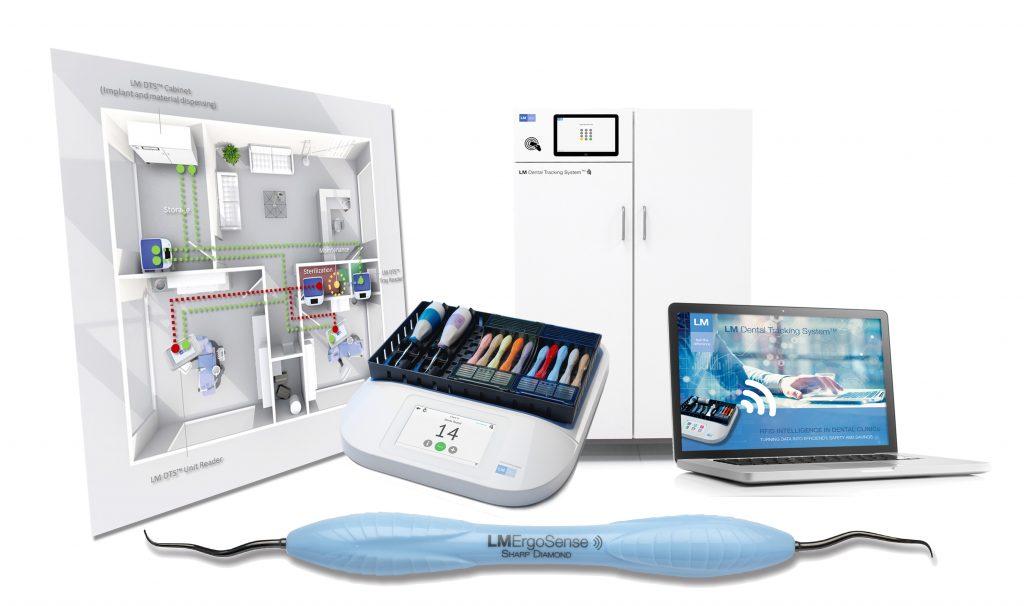
LM DTS™ Connect is a browser-based interface that lets you use LM DTS™ on existing computers, tablets, or smartphones with standard barcode scanners or RFID readers – no installation needed.
Because it runs in a web browser and works with common scanning devices, LM DTS™ Connect makes deployment extremely quick and flexible. For example, a dental school can have students and staff use their current PCs or tablets to scan items via LM DTS™ Connect, without needing new hardware. This low-barrier approach allows a single clinic or a large multi-site organization to start using LM DTS™ immediately, and then scale up the solution as needed.
LM DTS™ Tray Readers are high-speed scanning stations designed to read multiple RFID-tagged items at once, making it quick to scan entire instrument trays or sets in one go.
Tray Readers are typically placed at key points like the cleaning or sterilization area to ensure that all items in a tray are clean and properly accounted for within seconds. They are built for clinical use: you can surface-clean them, and their removable silicone mats (where you place instruments during scanning) are designed to be autoclaved. By using Tray Readers, busy clinics and universities can catch any missing or out-of-place instruments immediately, enhancing both safety and efficiency.
LM DTS™ Cabinets are smart RFID storage units that automatically track items whenever they’re taken out or put back in.
They maintain a real-time inventory count of whatever is stored inside them. For example, if someone removes a kit or a batch of materials from a Cabinet, the system instantly updates the remaining stock and notes who performed the action. This creates accountability and removes the need for staff to manually log usage. Cabinets are particularly helpful in large clinics, hospitals, or teaching institutions where many people share resources, as they ensure nothing goes missing and that you’re promptly alerted to low stock.
Integrations
LM DTS™ can connect to other software systems via its open REST API, enabling data exchange with platforms like patient record systems, procurement systems, or sterilization unit software.
This means LM DTS™ can share data with and receive data from your existing applications. For example, it could send usage data to your procurement system to trigger restocking, or receive schedule information to adjust availability tracking. Integrating LM DTS™ into your IT ecosystem eliminates duplicate data entry and ensures consistent information across tools, creating a more connected and efficient operation.
Yes. LM DTS™ integrates with Single Sign-On (SSO) solutions like Azure Entra ID, so users can log in with their regular organizational accounts.
This means your team can access LM DTS™ using existing usernames and passwords (e.g., hospital or university credentials) instead of managing separate login details. SSO makes things easier for your IT department by centralizing account management and improves the user experience with one less password to remember. It also leverages your organization’s established security protocols, ensuring that access to LM DTS™ aligns with your existing security policies.
Yes. LM DTS™ can associate instrument and material usage data with specific patient treatments or cases when configured accordingly.
Typically, this is done by using a unique identifier such as an “Encounter ID” or patient ID during scanning or via an integration with your patient management system. By capturing this, the system can tie the use of particular instruments or materials to individual patients or procedures. This provides a detailed audit trail for patient safety and quality assurance, helps with compliance (for instance, in case of sterilization records or recall situations), and can give insights into resource consumption per procedure for better planning and cost analysis.
Reporting & analytics
LM DTS™ has integrated reporting tools that turn your tracking data into useful insights and visual reports.
Within the system you can generate reports to understand trends like instrument utilization, material consumption, whether cleaning protocols are being followed on time, and how often specific sets are used. These reports help you pinpoint inefficiencies or overuse/underuse of resources—information that can lead to cost savings and process improvements. For example, reports might reveal that some instrument kits are rarely used (indicating they could be repurposed) or highlight if any workflow steps are frequently missed, prompting additional training.
Yes. LM DTS™ includes an embedded Power BI dashboard for instant analytics, and it provides a REST API for connecting to external reporting tools if needed.
The built-in Power BI reports let you visualize key metrics within the LM DTS™ interface, giving immediate insights into usage and performance. If you want to create custom analytics or combine LM DTS™ data with other sources, you can use the system’s API to export data and build your own reports in tools like full Power BI, Excel, or another BI platform. This flexibility ensures you can analyze and present the data in the way that best suits your organization’s decision-making needs.
Implementation & usage
No. LM DTS™ is designed to reduce daily workload, not add to it.
After implementation, the system automates tracking and record-keeping tasks that were previously manual. Routine duties like logging instrument use, checking process completion, or counting inventory are handled by LM DTS™ through scanning, which significantly cuts down on administrative work. In practice, your staff can spend less time on paperwork or looking for items, and more time on patient care and training. Many organizations find that LM DTS™ not only saves time but also reduces errors, because it enforces consistent processes automatically.
LM DTS™ implementation is generally quick and can be tailored to your schedule.
A basic setup for a single department or workflow can often be done in just a few days, including staff training. For larger multi-clinic deployments or implementations with many scanning points, the rollout might be phased over a few weeks to ensure a smooth transition. LM DTS™’s modular nature means you can start small—maybe focusing on one key area first—see immediate benefits, and then expand to additional modules or locations over time. This phased approach lets you manage change effectively while quickly gaining value from the system.
Support & availability
LM DTS™ provides dedicated support through a global network of local partners backed by LM™’s regional support teams.
This structure means you can get prompt, relevant help from experts who understand your local context and speak your language. Support covers everything from initial installation and configuration to ongoing queries or technical troubleshooting. LM also continuously updates the system (these updates are included as part of your service), ensuring you benefit from the latest features and security improvements without any extra effort on your part.
LM DTS™ comes with a wealth of support materials, including user manuals, quick-start guides and training videos.
These resources are accessible to all customers and cover topics from basic system operations to advanced configurations. They help new users learn the ropes quickly and allow experienced users to deepen their knowledge or find answers to specific questions at any time. Having thorough documentation and training content means your team can often find immediate answers on their own, reducing downtime and reliance on external support
If you need help during daily use, you can reach out to your local LM™ partner or LM™’s support team.
Whether you have a technical issue or just a question on how to use a feature, the support network is there to assist you. Because support is organized regionally, you’ll get assistance that’s prompt and relevant to your situation (with understanding of your local requirements). This ensures any disruptions are minimized and you always have guidance available to make the most of LM DTS™ in your day-to-day operations.
All you need to know about
LM Dental Tracking System™
We have gathered all frequently asked questions about LM Dental Tracking System™ on this page. In case there’s something else you’d like to know about LM DTS™, please contact us directly for further help!

Start your journey. Go beyond digital dentistry.
The determination of the customer-specific LM Dental Tracking System™ solution starts with core need identification: What is the current situation and what are the problem(s) and target(s) at the clinic.
Learn more about our solution how our smart entry editions and customized integrations.